Setting up an Xcode project to build MathLink applications can be confusing and tedius. Therefore I have created Xcode project templates for MathLink applications.
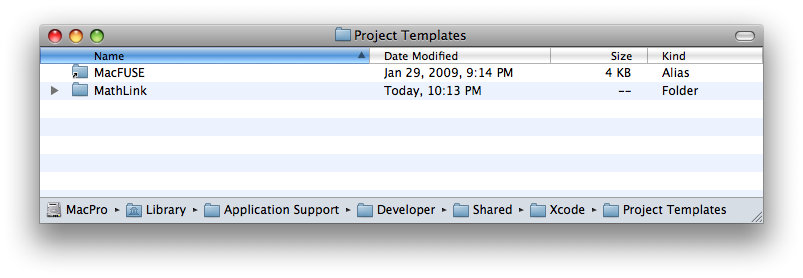
Download the templates here. Install the "MathLink" directory into "/Library/Application Support/Developer/Shared/Xcode/Project Templates/". After installation, when you create a new project in Xcode there will be a User Templates section that contains a MathLink subsection. Click on MathLink and find the two project templates.
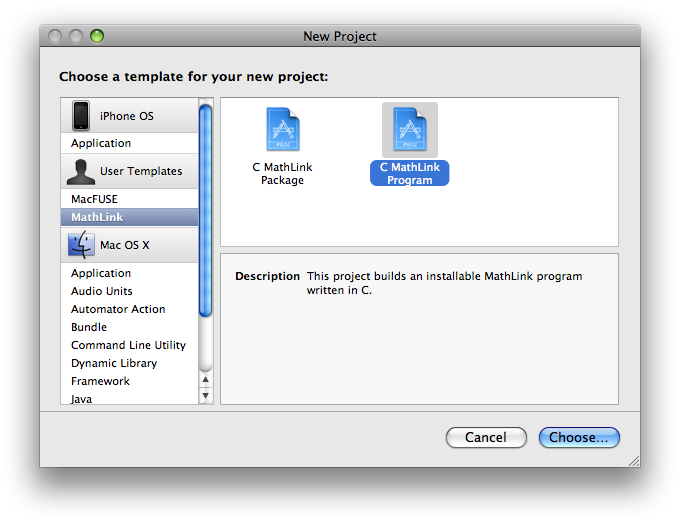
The first project template is called C MathLink Program. Use it for the very simplest of applications where you want to implement a function (or a few functions) in C/C++ and call it directly from Mathematica. The project will create a single executable (.exe extension, yes, .exe, yes, on Mac).
Build the target and begin using it in Mathematica with the Install command.
Note: if Mathematica is installed in a different location than /Applications/Mathematica.app you will need to adjust the value of the user defined MATHEMATICA build setting in the target info window.
The second project template is called C MathLink Package. Use it for more complicated applications that require both C/C++ code and supporting Mathematica code. The support code goes into init.m.
