[localhost:~]$ cat * > /dev/ragfield

Showing posts with label html. Show all posts

Monday, April 6, 2009

Some useful bookmarklets

In case you don't know, bookmarklets are bookmarks which run JavaScript code rather than open a specific web page. Here are a collection of bookmarklets I use on a semi-regular basis to speed up searching of frequently used web sites. Bookmarklets can do other things, since they run arbitrary JavaScript code.

To install them click on the hyperlink and drag it to your bookmarks bar (or maybe right/control-click on the link and choose a menu item to add to bookmarks). They may not work in all browsers, but these all work in Safari.

You can use them in one of two ways. First, if you just choose the bookmark it will pop up a dialog asking for the query text, then search the corresponding site for the text you enter. Second, you can select a piece of text on the current web page, then when you choose the bookmarklet it will automatically search the corresponding site for the selected text.

Wikipedia

javascript:x=''+getSelection();if(!x.length){x=prompt('Wikipedia:','')}if(x&&x.length){location.href='http://en.wikipedia.org/w/wiki.phtml?search='+escape(x)}

Dictionary

javascript:x=''+getSelection();if(!x.length){x=prompt('Dictionary:','')}if(x&&x.length){location.href='http:/dictionary.reference.com/search?q='+escape(x)}

Thesaurus

javascript:x=''+getSelection();if(!x.length){x=prompt('Thesaurus:','')}if(x&&x.length){location.href='http:/thesaurus.reference.com/search?q='+escape(x)}

Google Images

javascript:x=''+getSelection();if(!x.length){x=prompt('Google%20Images:','')}if(x&&x.length){location.href='http://images.google.com/images?hl=en&q='+escape(x)}

Google News

javascript:x=''+getSelection();if(!x.length){x=prompt('Google%20News:','')}if(x&&x.length){location.href='http:/news.google.com/news?q='+escape(x)}

Google Maps

javascript:x=''+getSelection();if(!x.length){x=prompt('Google%20Maps:','')}if(x&&x.length){location.href='http://maps.google.com/?q='+escape(x)}

IMDB

javascript:x=''+getSelection();if(!x.length){x=prompt('IMDB:','')}if(x&&x.length){location.href='http:/imdb.com/Find?for='+escape(x)}

Amazon

javascript:x=''+getSelection();if(!x.length){x=prompt('Amazon:','')}if(x&&x.length){location.href='http://www.amazon.com/exec/obidos/external-search/?keyword='+escape(x)}

eBay

javascript:x=''+getSelection();if(!x.length){x=prompt('eBay:','')}if(x&&x.length){location.href='http://search.ebay.com/search/search.dll?query='+escape(x)}

Tuesday, March 31, 2009

FlickrCalendar

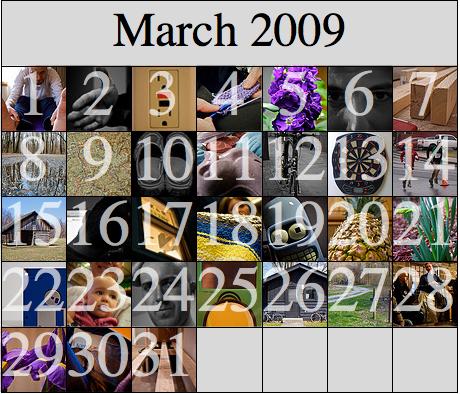
I take (at least) one photo each day and designate it my Photo of the Day. I have a set on Flickr with all of these photos and I thought it would be interesting to look at these in a calendar layout. I wrote a simple Mathematica package to do some basic photoset and photo management on Flickr. Using this package it is a simple matter to download all the Photos of the Day for a given month and arrange them in a calendar layout.
Load the Flickr package.
<<Flickr`
Get a list of all my photosets.
Short[sets = FlickrPhotosets[]]
{72157610604254463->Photo of the Day, <<22>>, 72157609839542329->S…on}
Get the ID of each photo in the "Photo of the Day" set.
set = First[sets]
72157610604254463->Photo of the Day
photos = FlickrPhotosetPhotos[set,
    {2009, 3, 1, 0, 0, 0}, {2009, 4, 1, 0, 0, 0}]
{3320801525, 3325013076, 3327845866, 3330214268, 3332574152, 3333951749, 3336286979, 3339612210, 3343616292, 3346180622, 3347410349, 3349861835, 3352196443, 3355574796, 3358281254, 3361319213, 3364753768, 3366450803, 3368858991, 3372005764, 3374713192, 3377655879, 3381457738, 3384282674, 3386926438, 3389038038, 3390498631, 3394129518, 3396858987, 3400094291, 3402856851}
Length[photos]
31
Import the 75x75 pixel "Square" sized thumbnail of each photo.
squares = FlickrPhotoImport[#, "Square"]& /@ photos;
First[squares]
Calendar tile
Overlay the day of the month on top of each thumbnail.
tiles = Table[
    Show[Rasterize[squares[[i]]],
        Graphics[{
            White, Opacity[0.667],
            FontSize -> 64,
            Text[ToString[i], {Center, Center}]
        }]
    ], {i, Length[squares]}
];
First[tiles]
Calendar tile
Get the URL of each image and make the tiles hyperlinks.
urls = First["urls" /. FlickrPhotoInfo[#]]& /@ photos;
First[urls]
http://www.flickr.com/photos/ragfield/3320801525/
tiles = Table[Hyperlink[tiles[[i]], urls[[i]]], {i, Length[tiles]}];
Now write a reusable calendar[] function which takes a list of content and lays them out into a grid for the specified month.
daysInMonth[year_Integer, month_Integer] := Part[
    {31,
    Which[
        Mod[year, 400] === 0, 29,
        Mod[year, 100] === 0, 28,
        Mod[year, 4] === 0, 29,
        True, 28
    ], 31, 30, 31, 30, 31, 31, 30, 31, 30, 31}, month
];
calendar[
    year_Integer,
    month_Integer,
    content_List,
    opts___
] := Module[
    {startDate, startDay, daysOfWeek, days},
    startDate = {year, month, 1, 0, 0, 0};
    startDay = DateString[startDate, "DayNameShort"];
    daysOfWeek = {"Sun", "Mon", "Tue", "Wed", "Thu", "Fri", "Sat"};
    
    (*
    if the month starts in the middle of the week
    prepend some empty strings to the content list
    *)

    days = Join[Table["",
        {Position[daysOfWeek, startDay][[1,1]] - 1}], content];
    
    (*
    if less content was specified than days in the month
    pad the end of content list
    *)

    days = Join[days, Table["",
        {daysInMonth[year, month] - Length[content]}]];
    
    (*
    if the month ends in the middle of the week
    append some empty strings to the content list
    *)

    days = Join[days, Table["",
        {Mod[7 - Mod[Length[days], 7], 7]}]];
    
    GraphicsGrid[
        Join[
            {Join[{Text[Style[
                    DateString[startDate,
                        {"MonthName", " ", "Year"}],
                    FontFamily -> "Times",
                    FontSize -> 48
                ]]},
                Table[SpanFromLeft, {6}]
            ]},
            Partition[days, 7]
        ],
        opts
    ]
];
Now add the tile images to the calendar.
c = calendar[2009, 3, tiles,
    Spacings -> 0, ImageSize -> 460,
    Dividers -> All, Background -> LightGray]
March calendar
We could export directly to JPEG, but since the image contains hyperlinks exporting to HTML will yield both a JPEG and the HTML code for an image map.
SetDirectory[CreateDirectory["/tmp/FlickCalendar"]];
Export["FlickCalendar.html", c, "GraphicsOutput" -> "JPEG"];

Download Mathematica Notebook

Download Flickr Mathematica package

Tuesday, March 17, 2009

Use Quartz2D Python bindings to rasterize HTML

Since (I believe) Mac OS X 10.2, the CoreGraphics framework (Quartz2D) has included incredibly useful bindings for the Python language. This makes it very easy to test code and to automate graphics related tasks.

A few days ago a colleague asked if I knew a simple way to automate the creation of image previews of web pages. In a couple minutes I whipped up a short Python script to do just that.

#!/usr/bin/python
import os, sys
from CoreGraphics import *

# what size image should we create?
w = 600
h = 430

# get the input and output file paths
if len(sys.argv) < 3:
	print 'usage: %s inputfile.html outputfile.png' % sys.argv[0]
	sys.exit()

input = sys.argv[1]
output = sys.argv[2]

# read the input file
f = open(input)
html = ''.join(f.readlines())
f.close()

# draw the HTML into a Quartz bitmap context then write that image to a PNG file
ctx = CGBitmapContextCreateWithColor(w, h, CGColorSpaceCreateDeviceRGB(), (0, 0, 0, 0))
ctx.drawHTMLTextInRect(CGDataProviderCreateWithString(html), CGRectMake(0, 0, w, h))
ctx.writeToFile(output, kCGImageFormatPNG)

Download Python script

Unfortunately, this simple script has a fairly major limitation. It doesn't do any network access, so the HTML file and all accompanying resources must be stored somewhere on your file system.